TikTok Ban Appeal and the Three Mistakes That Kill It
TikTok Ban Appeal and the Three Mistakes That Kill It
TikTok ban appeal failing? Most creators sabotage theirs before writing it. Walk through the exact process that gets accounts back.
- 1What Are the Different Types of TikTok Bans
- 2What Is the Real TikTok Ban Appeal Success Rate?
- 3How TikTok Strikes Work and Where to Track Your Appeal
- 4Why Most TikTok Ban Appeals Fail
- 5How to Submit a TikTok Ban Appeal Step by Step
- If You Can Still Access the App
- If You Cannot Access the App
- 6What to Write in the TikTok Appeal Box
- 7What Are Realistic TikTok Ban Appeal Timelines
- 8What Happens When Your TikTok Appeal Gets Denied
- 9How to Prevent Future TikTok Bans
- 10Frequently Asked Questions
- Can I still log in after a permanent TikTok ban?
- What is the success rate of a TikTok ban appeal?
- How many times can I appeal a TikTok ban?
- Does TikTok tell you why your account was banned?
- What happens to my TikTok Shop money if I get banned?
- Should I hire a social media lawyer for my TikTok appeal?
- Is creating a new TikTok account after a ban safe?
- How long do TikTok strikes stay on your account?
- Is there a deadline to appeal a TikTok ban?
TL;DR: A TikTok ban appeal is filed from the ban message inside the app, and TikTok publishes no success rate and no deadline for a Community Guidelines ban. The only dated clock it publishes for an account ban is the underage one, where a US account is deleted on day 30 unless the appeal goes in within 23 days, while TikTok Shop violations carry their own 30-calendar-day appeal window. Strikes expire after 90 days, the appeal status shows in the Safety Center, and the three moves that hurt most are deleting videos, making a new account, and refiling the same appeal.
Your TikTok account got banned and the first thing you did was one of three things: you deleted the video that caused it, you created a brand new account, or you fired off three identical appeals in 20 minutes. All three of those moves made your situation worse.
The TikTok ban appeal process is recoverable for the majority of first-time violations. The problem is that most creators do not understand the system well enough to use it correctly, and the panic response after a ban is almost always the wrong response.
What I want to walk you through here is the full appeal process across every ban tier, from a temporary restriction to a permanent ban. You will know exactly what to do in the first hour, what to write in the appeal box, what realistic timelines look like, and what your options are if the appeal fails.
If your issue is more about reduced visibility than a full ban, the TikTok shadowban recovery guide covers the diagnostic and fix for that separate problem.
What Are the Different Types of TikTok Bans
TikTok enforces three distinct ban tiers, each with its own appeal path.
Treating a temporary restriction the same as a permanent termination wastes time and can trigger additional flags on your account.
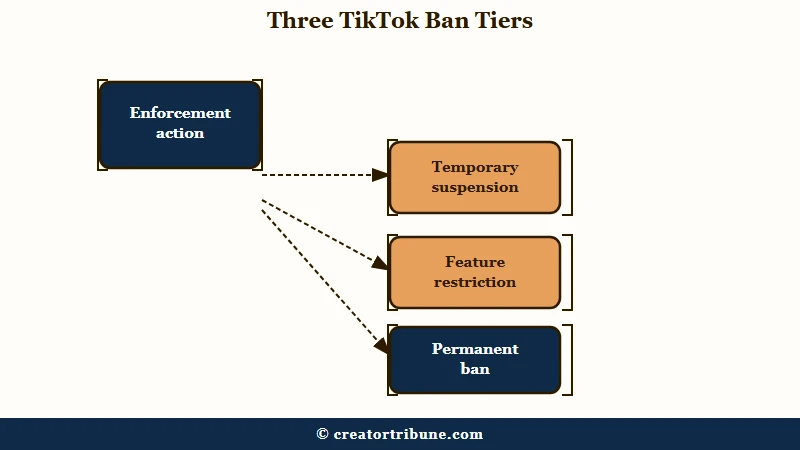
From what I’ve seen, the confusion between these tiers is where most creators go wrong. A temporary restriction usually lifts on its own, while a permanent ban has to be appealed from the ban message, and TikTok publishes no deadline for that appeal on a Community Guidelines ban. The one exception is an underage ban, where a US account is deleted on day 30 unless you appeal within 23 days, which the TikTok age verification guide walks through region by region.
| Ban Type | Reported duration | Cause | Appeal Needed |
|---|---|---|---|
| Temporary suspension | 24 hours to 7 days | Minor or first-time violation | Usually not, auto-expires |
| Feature restriction | 1 to 14 days | Comment, Live, or posting privileges removed | Optional, speeds up restoration |
| Permanent ban | Indefinite | Severe violation or repeated strikes | Yes, from the ban message in the app |
The durations in that table come from creator reports rather than from TikTok. Its current enforcement page describes the ladder, from a removal or a restriction up to a ban, without publishing how long a temporary restriction lasts.
A temporary suspension locks your account for a set period and then restores access automatically. You can still log in, but you cannot post, comment, or go Live. These typically resolve themselves without any action.
Feature restrictions are more targeted. TikTok removes a specific capability, like commenting or going Live, while leaving the rest of your account usable, and a Live restriction for suspicious activity has its own recovery path. Creator guides describe these as the easiest tier to get reversed, though TikTok publishes no figures either way.
Permanent bans are the serious tier. TikTok bans an account on the first strike for severe violations such as threatening violence or exploiting minors, and it also bans an account that reaches the strike threshold inside one feature or one policy area. You can still open the app to file the appeal and to download your data.
What Is the Real TikTok Ban Appeal Success Rate?
TikTok does not publish account-level appeal success rates, so any single percentage quoted for ban appeals is an estimate rather than an official number. What TikTok does publish is enforcement data, and the newest full report covers January to March 2026 and came out in July.
Its Q1 2026 Community Guidelines Enforcement Report, covering January to March, records 184,012,576 videos removed worldwide, roughly 0.5 percent of everything uploaded. Of those removals, 8,838,710 were put back after further review, about 4.8 percent.
Read that number carefully, because it counts videos and not accounts. A video reinstatement is a far lighter decision than restoring a terminated account, so 4.8 percent tells you reversals are routine at TikTok’s scale without telling you your personal odds.
The same report attributes 178,014,154 of those removals to automated detection, about 96.7 percent of the total. Machines make the first call on nearly every enforcement action, which is why a human reviewer holding your evidence can land somewhere different.
The report also puts account bans in proportion. TikTok removed 86,288,705 fake accounts and 25,764,372 accounts it suspected belonged to users under 13 in that one quarter, so an age flag or a fake-account flag is worth ruling out before you argue about a video.
How TikTok Strikes Work and Where to Track Your Appeal
TikTok runs an account-level strike system: each removal adds a strike, strikes expire after 90 days, and an account is permanently banned once it reaches the strike threshold within one feature or one policy area.
TikTok laid this out in its February 2023 enforcement update, which also says accounts that pile up a high number of strikes across policies and features get banned. Severe violations still draw a permanent ban on the first strike, and the same update added an Account status page in the in-app Safety Center where you can see your standing, next to a Report records page for reports you filed about others.
The current Community Guidelines enforcement page, in force since September 13, 2025, says a filed appeal shows its status in that same Safety Center. Check it there before you read silence as a denial, and see the video removal guide for what a single removal does to your standing.
Why Most TikTok Ban Appeals Fail
Most appeals fail on one of three mistakes creators make in the first hours after a ban.
The appeal system is designed to work. The problem is what people do before they use it.
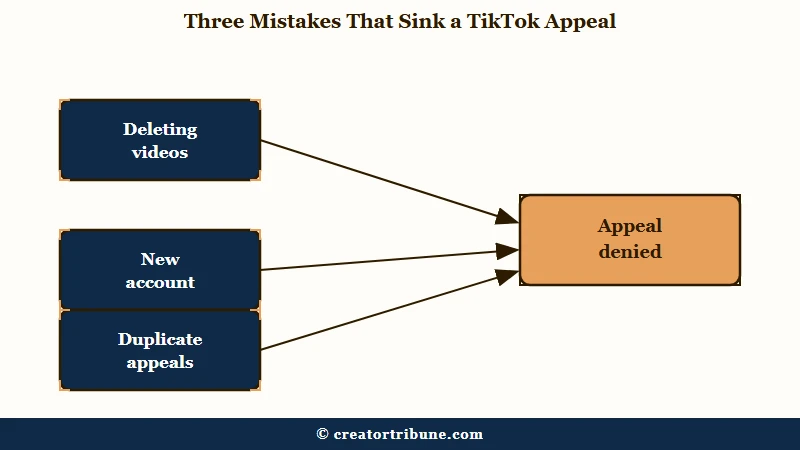
What I’d recommend understanding first is the three errors that tank your chances before you even open the appeal form.
Mistake 1: Deleting videos in a panic. TikTok has usually already removed the video it enforced on, so what creators delete is everything else that looks risky. That wipes the context a reviewer could use to judge the account as a whole.
Leave everything where it is until the appeal is decided.
Mistake 2: Creating a new account immediately. The appeal belongs to the banned account, and that is the only account TikTok will restore. TikTok’s Community Guidelines list trying to avoid enforcement as a reason to ban an account, and say TikTok may ban additional or new accounts you create, so a new account buys nothing and can cost you a second removal.
Mistake 3: Submitting multiple appeals at once. TikTok’s enforcement page says a filed appeal shows its status in the in-app Safety Center, so there is nothing to gain by refiling while the first one is open. One well-written appeal is the whole game.
Reviewers work from what you hand them. A first appeal carrying dated screenshots and the original files gives a reviewer something to act on, while a generic or repeated one gives them nothing new to weigh.
How to Submit a TikTok Ban Appeal Step by Step
The TikTok ban appeal is filed from the ban message inside the app, and its status then appears in the in-app Safety Center, which TikTok’s Community Guidelines spell out under Notice and Appeals.
The process differs slightly depending on whether you can still access the app.
The in-app path is the one TikTok documents, and the web form is a fallback for when login itself fails. Here is the sequence I’d walk through for each scenario.
If You Can Still Access the App
- Open TikTok. A banned account gets a message about the ban as soon as the app opens, and that message is where the appeal lives.
- Tap the appeal option inside that message and read the policy it cites before you write a word.
- Write your appeal in the text box (see the next section for what to include).
- Attach screenshots and any supporting evidence the form accepts.
- Submit and note the date.
- Track it on the Account status page inside the Safety Center, under Settings and privacy and then Support, which is where TikTok shows your standing and the status of your appeal.
If You Cannot Access the App
- Go to TikTok’s feedback form at tiktok.com/legal/report/feedback.
- Pick the topic closest to your problem. Account access / security is the one for a login or ban lockout.
- Fill in the contact details it asks for, usually your email and username, plus the appeal text.
- Upload supporting documents if the form offers an attachment field for your topic.
Before: You see the ban notification, panic, and type “I didn’t do anything wrong please unban me” into the appeal box.
After: You screenshot the ban notice, identify the specific policy cited, gather your evidence, and write a structured 300 to 500 word appeal that addresses the exact violation.
The second version is the one that gets first-time violations overturned.
What to Write in the TikTok Appeal Box
An effective TikTok ban appeal is 300 to 500 words, addresses the specific policy violation cited, includes evidence, and demonstrates understanding of the guidelines.
Shorter appeals lack detail for reviewers. Longer ones get skimmed.
What I’d suggest structuring your appeal around is this five-part framework. Every successful appeal I’ve seen follows some version of it.
- State the specific policy and your position. One sentence. Name the exact Community Guideline that TikTok cited and state whether you believe the enforcement was an error or a misidentification.
- Provide context for the flagged content. Two to three sentences. Explain what the video was about and why it does not violate the cited policy. Be factual, not emotional.
- Attach supporting evidence. Screenshots, timestamps, content creation dates, original files proving the content is yours. If your account was compromised, include IP logs or login history.
- Reference your compliance history. One to two sentences. If you have a clean record before this violation, say so. Mention how long the account has been active and any previous good standing.
- State your commitment to the guidelines. One sentence. Acknowledge that you understand the policy and will continue to comply. It shows the reviewer you understand the system.
The tone matters. Professional and polite wins. Angry, threatening, or sarcastic language gets your appeal deprioritized or dismissed entirely.
Do not pad the appeal with claims you cannot back up. If you did post something that could reasonably be flagged, acknowledging it while explaining the context reads better to a reviewer than pretending it never happened.
What Are Realistic TikTok Ban Appeal Timelines
TikTok publishes no appeal response times, and the ranges below are what creator guides report: roughly 3 to 7 business days for a first response and 7 to 14 days for a permanent ban review.
Planning around these windows prevents the panic-driven mistakes covered earlier.
Here is how the timeline breaks down by ban type.
| Ban Type | First Response | Full Resolution | Reported reversal odds |
|---|---|---|---|
| Temporary (first offense) | 1 to 2 business days | Auto-expires in 24h to 7 days | No appeal needed |
| Feature restriction | 1 to 3 business days | 3 to 7 days after appeal | 60 to 70 percent (with evidence) |
| Permanent (first severe) | 3 to 7 business days | 7 to 14 days | 30 to 40 percent (with evidence) |
| Permanent (AI false flag) | 3 to 7 business days | 7 to 14 days | 40 to 55 percent |
| Permanent (repeat offender) | 7 to 14 business days | 14 to 30 days | Under 10 percent |
Those response times and reversal ranges circulate widely in creator guides, but TikTok has never published appeal timelines or results by ban type, so treat them as rough community estimates. Use them to rank the tiers against each other instead of as a promise about your own case.
The deadlines that do exist sit outside Community Guidelines bans. A US account banned as suspected under 13 is deleted on day 30 unless the appeal goes in within 23 days, while UK, EEA and Swiss accounts get 180 days, and most other regions get 113, so treat an age-related ban as the one with a real clock.
TikTok Shop runs a separate clock. Its Seller Center appeals page says each Shop violation can be appealed once, within 30 calendar days of the violation notice, and that TikTok Shop decides within 7 business days.
What I’d recommend during the waiting period is to leave the account alone and check the Safety Center once a day rather than refiling.
What Happens When Your TikTok Appeal Gets Denied
A denied TikTok appeal still leaves you options, though they narrow and the timeline stretches. The worst response to a denial is immediately resubmitting the same appeal.
In my experience, the first denial is often an automated response or a human reviewer who did not have enough context. The path forward depends on why it was denied.
If the denial was generic with no specific explanation, TikTok publishes no rule on resubmitting, so the practical move is to gather evidence you did not have the first time and file once more through the same route with a new explanation. Do not copy and paste your original appeal.
If the denial cited a specific policy you believe you did not violate, escalate through TikTok’s social media channels. Direct messages to TikTok’s official accounts on other platforms have been reported to trigger a second review, though this is inconsistent.
If the denial is for a serious violation like fraud or coordinated inauthentic behavior, the odds of reversal are close to zero. At that point, the honest assessment is that the account is likely gone.
The same suspension patterns play out on other platforms with similar appeal structures. Instagram account recovery follows a similar evidence-based appeal process, and YouTube channel termination appeals use the same tiered violation system. Understanding the pattern across platforms helps you build stronger cases on each one.
Scale is the reason a careful appeal has a real chance. TikTok’s enforcement page says content goes through an automated review first and is either removed or flagged for a moderator, and its Q1 2026 report shows automated detection made the first call on 178 million of the 184 million videos removed, so your appeal is often the first time a person looks at the case.
How to Prevent Future TikTok Bans
The most reliable ban prevention strategy is understanding which content patterns trigger automated flags, since TikTok’s own report attributes nearly all removals to automated detection.
Most creators get banned for patterns they do not realize the system is watching for.
What I’d recommend focusing on is the five triggers behind the bulk of enforcement actions.
- Community guideline violations. This includes safety content, harassment, and misinformation. The AI flags keywords, audio patterns, and visual elements. If your content is educational or satirical, add clear context in the caption and on-screen text.
- Suspected underage accounts. TikTok removed 25,764,372 accounts it suspected were under 13 in the first quarter of 2026 alone, and the flag can fire with no content violation at all. Appeal with the ID, face-scan or card check the notice offers, and mind the deadline, because a US account is deleted on day 30.
- Copyright and DMCA. Using copyrighted music outside of TikTok’s Commercial Music Library on a business account is a common trigger. Stick to the official library or use original audio.
- Spam and fake engagement. Automated following, purchased likes, and repetitive comment patterns all trigger this. If you use any third-party growth tools, stop immediately.
- Mass reporting. Other users can weaponize the report system. If you receive a coordinated reporting attack, include this context in your appeal and provide evidence of normal engagement patterns.
The Facebook page restriction guide covers a similar pattern-based detection system that Meta uses across its platforms, and understanding one helps you navigate the other.
If you are hitting daily engagement limits before a ban, the TikTok limits breakdown explains the thresholds that trigger throttling versus actual enforcement action.
Frequently Asked Questions
Can I still log in after a permanent TikTok ban?
Yes. TikTok shows the ban message inside the app, that message is where you appeal, and you can still download your data. For an underage ban the account itself is deleted on a published clock, day 30 in the US, so file early.
What is the success rate of a TikTok ban appeal?
TikTok has never published one. Its Q1 2026 enforcement report shows 8,838,710 of the 184,012,576 videos it removed were reinstated after review, about 4.8 percent, but that is a video-level figure and account appeals are decided separately.
How many times can I appeal a TikTok ban?
TikTok publishes no limit and no waiting period. File one appeal per enforcement, watch its status on the Account status page in the Safety Center, and only refile after a denial if you have new evidence to add.
Does TikTok tell you why your account was banned?
TikTok shows a banner or inbox notification in the app citing the specific Community Guideline that was violated. If you did not see one, open the inbox tab inside the app and the Account status page in the Safety Center.
What happens to my TikTok Shop money if I get banned?
Creator guides report pending commissions being held while an account is banned and released on the normal schedule if the appeal succeeds. TikTok publishes no timeline for this, so file the appeal first and raise the payout separately through TikTok Shop support.
Should I hire a social media lawyer for my TikTok appeal?
For most first-time violations, a well-written self-appeal is sufficient. Lawyer fees vary widely, and a lawyer is most useful for permanent bans involving intellectual property disputes or accounts with significant revenue at stake.
Is creating a new TikTok account after a ban safe?
No. The appeal belongs to the banned account, and TikTok’s Community Guidelines say it may ban additional or new accounts you create after a ban. A new account does nothing for the appeal and can cost you a second removal.
How long do TikTok strikes stay on your account?
Strikes expire from your account record after 90 days, according to TikTok’s 2023 enforcement update. You can see your current standing on the Account status page in the app’s Safety Center.
Is there a deadline to appeal a TikTok ban?
Not a published one for Community Guidelines bans. Underage bans are the exception: a US account is deleted on day 30 unless you appeal within 23 days, while UK, EEA and Swiss accounts get 180 days, and most other regions get 113. TikTok Shop violations are separate and can each be appealed once within 30 calendar days of the notice.